AI can help write content faster, but churning out AI-generated content isn’t enough for technical audiences who value quality.
To scale content without sacrificing quality, you need to use AI in the three stages of content creation:
Research
Writing
Editing
Using AI for Research
Research and content briefs are the foundation of quality content, but they’re also time-consuming. Before you create a valuable guide or documentation update, you need to identify what your audience needs to know, understand what’s already been written, and gather information from multiple credible sources. This research phase can take hours.
Now, with AI research tools such as ChatGPT, Perplexity, or Claude, this timeline can be reduced to minutes. Rather than manually reviewing competitor documentation, blog posts, and technical resources, AI extracts key insights and returns them with source citations for verification.
You get a solid foundation of relevant information without spending hours hunting for it.
Creating Content Using AI + Templates
Creating content from scratch every time is slow and mentally exhausting.
Each piece requires you to make the same decisions repeatedly, what structure works, how much detail to include, and what tone to use, adding cognitive overhead that slows production and creates inconsistency.
Using templates for different content types solves this. By defining your content baseline, you can create more consistent, high-quality content using AI.
You can use LLM chat apps like ChatGPT or Claude to analyze your best-performing content or industry examples, identifying the patterns that make them effective, and turn them into templates. Include the templates in your content-generation prompts to produce content that adheres to the proven structure and quality standards you’ve defined.
This ensures AI-generated content matches your quality standards from the first draft, reducing the need for extensive rewrites.
Using AI to Review Content
Most people use naive techniques when reviewing content with AI.
They paste content into ChatGPT with vague prompts such as “review this” or “make this better,” without specifying the standards or criteria to evaluate against. This results in inconsistent feedback across reviews, making it unreliable as a quality gate.
To get more reliable reviews, create a review checklist based on your style guide and include it in your review prompt. A review checklist breaks down your quality standards into actionable items that the LLM can use to identify issues and suggest fixes to them.
Beyond manually pasting review prompts, you can automate the review process using prose linters like VectorLint in GitHub Actions. This ensures consistent evaluations and style enforcement across your team, with every piece of content automatically reviewed against your style guide before reaching human reviewers.
Catching style and quality issues at multiple stages of your workflow reduces review cycles and enables faster content delivery.
Start Small, Scale Gradually
You don’t need to implement all three strategies at once to see results. Start with research, then add templates, and finally automate the review process.
Use Perplexity or Claude to generate research reports that you can feed directly into your content generation AI. This ensures the AI only cites information from your research, making the output more accurate. Verify key facts and technical details before using the research in production content.
You can start with publicly available templates or use an LLM tool to generate templates from proven content, then include them in your content-generation prompts to produce cleaner drafts.
Start with ChatGPT and a review checklist based on your style guide to speed up your review process. If you use a Docs as Code workflow, implement automated reviews in GitHub Actions using prose linters such as Vale, Markdownlint, and VectorLint.
AI-assisted research, template-driven content, and automated review workflows are all you need to scale your content strategy.
When you use AI to draft documentation, whether tutorials, guides, or API references, you save hours of writing time.
The problem is that AI-generated content often contains AI patterns that could erode developer trust:
“It’s important to note that…” “In the landscape of software development…” “This isn’t just X; it’s Y.”
Even when your content is technically accurate, these patterns make it sound lazy.
You could manually review every piece of content to catch these patterns, or you could automate your review process to catch them instantly.
This guide shows you how to use VectorLint to automatically check for AI patterns in your Docs as Code workflow.
Table of Contents
VectorLint, AI-Assisted Editing
VectorLint is an AI-powered prose linter that enables natural-language standard enforcement.
It uses LLM-as-a-Judge to evaluate content and catch quality issues, making it possible to catch issues like terminology and spelling errors that only require pattern matching, and also those that require contextual understanding, such as AI patterns, Search Engine Optimization (SEO) problems, and technical accuracy.
As a command-line tool, it runs in CI/CD pipelines, enabling a shared quality gate across your teams, preventing errors from reaching production.
To get started, install VectorLint on your computer.
Installing VectorLint
Install VectorLint: To install VectorLint globally, run:
npm install -g vectorlint
Verify installation:
vectorlint --version
Alternatively, you can run it directly using npx:
npx vectorlint
Configuration
Before you can review content with VectorLint, you need to connect it to an LLM provider.
Initialize VectorLint: Run the initialization command to generate your configuration files:
vectorlint init
This creates two files, .vectorlint.ini which contains project-specific settings and ~/.vectorlint/config.toml where you configure your LLM provider settings.
   # VectorLint Configuration
   # Global settings
   RulesPath=
   Concurrency=4
   DefaultSeverity=warning

   # Default rules for all markdown files
   [**/*.md]
   RunRules=VectorLint
This configuration tells VectorLint to check all Markdown files using the bundled VectorLint preset.
Configure your API keys: Open your global config file (~/.vectorlint/config.toml) and uncomment the section for your preferred LLM provider. VectorLint supports OpenAI, Anthropic, Google, and Azure models.
Uncomment your preferred provider and add your API key. See the configuration guide for full details.
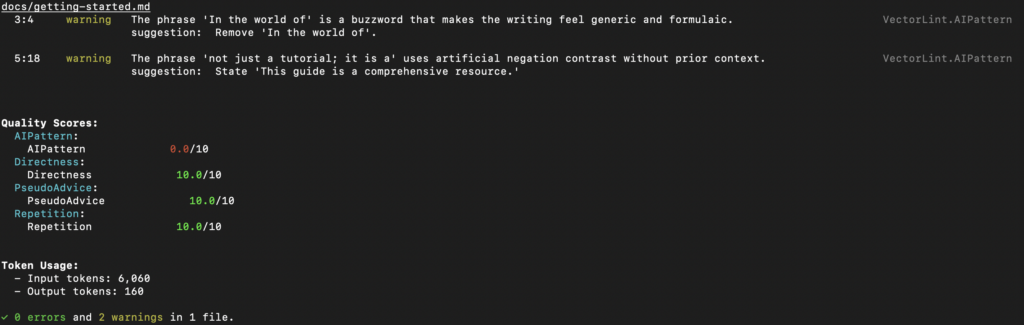
Create a test file: Create docs/getting-started.md with some content containing AI patterns:
   # Getting Started

   In the world of software development, getting started with any new tool can be daunting.

   This guide is not just a tutorial; it is a comprehensive resource for developers.
Configure AI pattern detection: VectorLint comes bundled with a VectorLint preset that includes AI pattern detection rules. The init command automatically configures this in your .vectorlint.ini file. The VectorLint preset includes these rules: AI-Pattern, Directness, PseudoAdvice, and Repetition. Rules in rule packs are automatically enabled unless explicitly turned off. For this guide, you only need the AI-Pattern rule, so turn off the others in your .vectorlint.ini:
This workflow runs VectorLint on every pull request, checking all modified Markdown files against your quality rules. If VectorLint finds quality issues, the build fails, and the quality report appears in the PR comments.
Next Steps
You’ve now automated the detection of excessive hedging in your documentation. But there are more AI patterns worth catching:
Expand your rule pack:
Define rules that match your company’s style guide
Share your rule packs across repositories
Use VectorLint scores as a metric for documentation quality
By creating more rules, you can automate more quality checks and save time on content review. This helps you keep up with development velocity while maintaining the quality and trust your brand depends on.
With LLMs now capable of creating and reviewing content at scale, your Docs as Code workflow is incomplete without an AI prose linter.
Although traditional prose linters can catch many errors, their syntactic approach means they can’t catch errors that require contextual judgment.
To solve this problem, many teams use LLM-powered apps like ChatGPT or Claude. However, this remains outside the team’s shared automated testing workflow, resulting in inconsistent quality.
These apps aren’t tuned for consistent evaluations, and different team members use different prompts and processes. Even with a shared prompt library, you’re still relying on each contributor to use it correctly.
An AI prose linter solves this by providing AI reviews and suggestions in your Docs-as-Code workflow. You can achieve reliable automated quality checks by setting the LLM to low temperatures, using structured prompts, and configuring severity levels.
Table of Contents
Making AI Prose Linters Reliable With Severity Levels
AI prose linters inherit the non-determinism of their underlying technology, which means they will occasionally generate false positives.
Because the whole point of a CI pipeline is to deliver reliable builds, this is a bad recipe for your pipeline. The solution is to configure them as non-blocking checks that highlight potential issues and suggest fixes without failing your build.
Just like traditional prose linters aren’t perfect, AI prose linters don’t need to be either.
Even if you get 50% accuracy on quality flags, you’d be saving half the time you’d otherwise spend hunting for them yourself.
With that out of the way, here are four reasons you should adopt an AI prose linter in your Docs as Code workflow.
1. It Reduces Time Spent on Reviews
AI prose linters reduce the time spent on manual content reviews by catching contextual issues that typically require human judgment.
While traditional prose linters can catch terminology and consistency issues, the bulk of review time is typically spent on editorial feedback. This involves identifying issues that require contextual judgment, such as whether there is repetition of concepts across sections or if content directly answers the reader’s question.
By codifying these editorial standards into AI prose linter instructions, you can catch these issues locally or in the CI pipeline, and get suggested fixes. This reduces the mental load on reviewers and saves time.
2. It Enables Broader Team Contribution
AI prose linting enables developers, engineers, and product managers to contribute high-quality documentation by providing them with immediate, expert-level editorial feedback as they write.
Technical writers are often stretched, with some teams operating at a 200:1 developer-to-writer ratio. To get documentation up to date promptly, non-writers often need to contribute. While you can save a lot of time with traditional linters catching typos and broken links, you can make contributing even easier by using AI prose linting.
Not only does it broaden the scope of issues you catch, but it also helps contributors learn the reason behind the flags and provides them with suggestions to fix them, making them more confident in their contributions.
3. It Lowers the Barrier to Docs as Code
Teams who don’t have a dedicated documentation engineer often refrain from adopting a Docs as Code workflow because of its maintenance overhead. It often requires an ongoing effort to create and maintain rules as the team creates more content.
While traditional linters often have preset style rules that you can start with, you’ll still need to maintain them to deal with false positives that block merges, or to catch new issues that come up.
AI prose linters solve this problem by using natural language instructions to define rules. This enables you to catch a wide range of issues with fewer instructions, reducing the maintenance overhead.
For instance, if you wanted to catch hedging language using Vale, you’d need to write a regular expression covering as many variations as you can think of such as `appears to`, `seems like`, `mostly`, `I think`, `sort of`, etc.
With an AI prose linter, you can simply write:
`Check for any phrase that connotes uncertainty or lack of confidence (for example, “appears to”, “seems like”)`
And it can catch variations you never thought to list.
The trade-off is that natural language tends to leave room for edge cases, and so without precise instruction, you can get false positives. However, the cost of maintaining a wide library of rules or trying to envisage every edge case far outweighs the cost of filtering out false positives.
4. It Accelerates Productivity For Solo Writers
To achieve high-quality, error-free content, solo writers still have to review their own work. However, the biggest hurdle isn’t a lack of skill; it’s the human factor. When you’re the only person writing and editing thousands of lines of documentation, you lose the “fresh eyes” benefit that teams take for granted.
After the fifth hour of editing a technical guide, fatigue sets in, making it easy to miss quality issues. An AI prose linter serves as a peer reviewer, turning the review process into simple “yes” or “no” decisions.
The AI highlights the issues, and you decide whether they’re valid quality issues or not. This is less mentally taxing and faster than if you had to find the issues yourself.
Knowing you have an automated editorial pass gives you confidence, allowing you to focus on providing value rather than worrying if you’ve missed a subtle stylistic error.
Using VectorLint, an Open Source AI Prose Linter
VectorLint is the first command-line AI prose linting tool.
We built it to integrate with existing Docs-as-Code tooling, giving your team a shared, automated way to catch contextual quality issues alongside your traditional linters.
You can define rules in Markdown to check for SEO optimization, AI-generated patterns, technical accuracy, or tone consistency, practically any quality standard you can describe objectively.
Like Vale or other linters you already use, VectorLint runs in your terminal and CI/CD pipeline as part of your standard testing workflow.
Your engineering team already relies on linters like ESLint, Prettier, or Rubocop to catch code issues before they reach production.
These tools flag style violations, enforce consistency, and reduce code review time by automating the tedious aspects of quality control, leading to quicker code reviews, consistent output, and a lower mental burden.
Unfortunately, most technical teams don’t apply this same practice to their technical content.
Docs, guides, and tutorials undergo entirely manual reviews, where reviewers spend time flagging missing Oxford commas, inconsistent terminology, and overly long sentences.
If you’re a small content team supporting dozens of engineers or managing contributions from external developers, this manual review process becomes a bottleneck.
Reviewing technical content manually results in slow publishing cycles, inconsistent docs quality, and frustrated contributors.
This is where prose linting comes in.
Prose linting solves these issues by automating style and consistency checks the same way code linters do. It’s a significant part of the Content as Code approach: treating all technical content with the same rigor as code.
Table of Contents
What Is Content as Code?
Content as Code extends the Docs as Code methodology beyond docs to all technical content, meaning guides, tutorials, and blog posts, treating them with the same rigor as software code.
This means writing content in Markdown, storing it in version control, conducting reviews through pull requests, and running automated quality checks as part of your publishing pipeline.
Everything sits in the same repository and follows the same development workflow.
This approach works well for engineering teams because it integrates seamlessly with the tools they use daily. There’s no need to switch to a separate editor or learn a new publishing system. Writing, reviewing, and releasing docs becomes part of the same workflow as writing code.
This methodology provides proper version history for all content, supports collaborative workflows across roles, and supports the addition of automated quality checks as part of the publishing pipeline.
Organizations like Google, Microsoft, GitHub, Datadog, and ContentSquare already use Docs as Code. Extending it to all technical content enables faster growth.
You Grow Faster with Automated Content QA
Ship Content Faster
Automated linting handles the first-pass review for style, terminology, and consistency, so human reviewers can focus on technical accuracy instead of policing syntax.
Authors get feedback immediately in their IDE or when they open a pull request, allowing issues to be corrected before review, shortening review cycles, and increasing merge speed without reducing quality.
Automated checks made this volume possible by catching repetitive style issues early and reducing the mental load on writers and reviewers without adding headcount.
When a prose linter like Vale runs in CI, it catches most style guide violations even before a human reviewer sees the PR, so reviewers spend less time pointing out minor fixes, and pull requests move through review faster.
Scale Your Contributor Program
External contributors often submit content with inconsistent style and terminology because they haven’t memorized your style guide. Without automated checks, reviewers spend time explaining these standards through manual feedback on every PR.
However, automated prose linting communicates these standards through immediate, actionable feedback, so contributors see and grasp “what good looks like” without reading lengthy style guide documents.
Engineers reported feeling more confident contributing because they received clear guidance about what to fix. This lowers the barrier to entry for developers who are technical experts first and writers second.
Build Developer Trust
Consistent terminology and style signal professionalism and reliability to your users.
Docs quality directly shapes product trust and adoption, especially with technical audiences who quickly lose confidence when they encounter inconsistent terminology or explanations.
If one page says “authenticate” and another says “log in,” or if the same concept is described in different ways across pages, developers notice.
Automated quality checks prevent these issues before they reach production by enforcing consistency across the entire docs set, which helps you maintain credibility as the product evolves.
Furthermore, automated checks ensure your docs remain current as your products evolve. When docs lag behind releases, developers lose confidence in their accuracy.
Automated checks solve this by allowing teams to ship updates quickly without compromising quality standards. The combination of consistent quality delivered at speed becomes a competitive advantage for developer adoption.
What Vale Does
To implement automated prose linting, most engineering teams start with Vale, an open source prose linter that checks content against style rules.
It runs locally on your machine, inside your IDE, via pre-commit hooks, in pull request checks, or as part of your CI/CD pipeline.
Vale understands the syntax of Markdown, AsciiDoc, and reStructuredText, so it can parse your content correctly and ignore code blocks or other markup.
Alternative prose linters include textlint, proselint, and alex, but Vale is the most common choice among engineering teams.
Basic Setup Steps
Install Vale via your package manager (Homebrew on macOS, Chocolatey on Windows, or apt/yum on Linux)
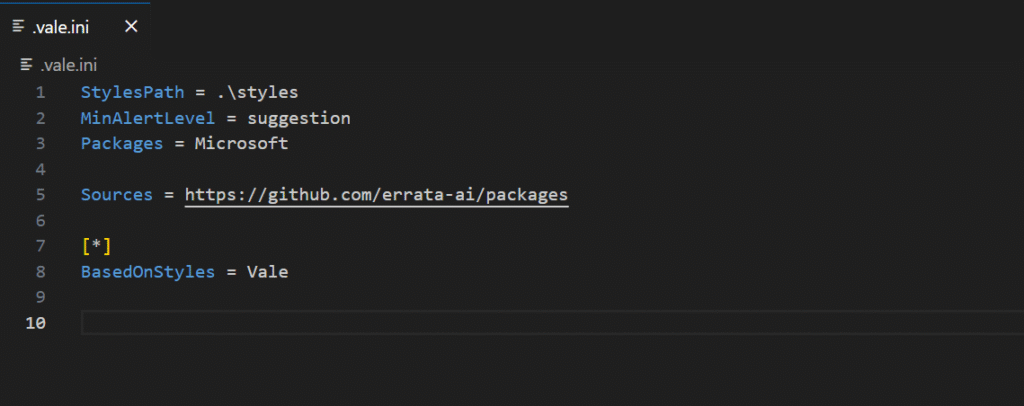
Generate a .vale.ini default configuration file at your project root. You can use existing style packages like Google or Microsoft, or create custom rules.
Run vale sync to download the style package
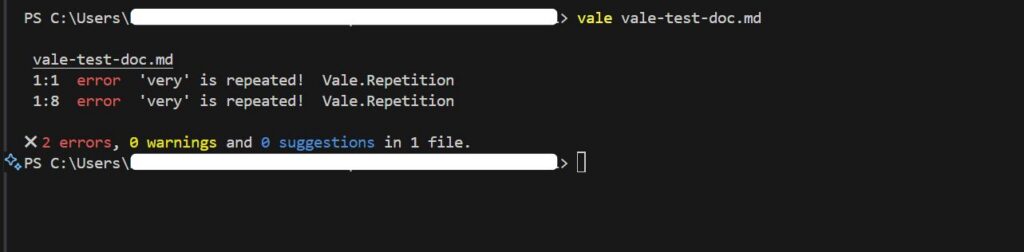
Run vale [path/to/content] to lint your files
What Automated Feedback Looks Like
Vale flags issues with line numbers and provides suggested fixes for problems like overly long sentences, filler words, inconsistent terminology, and style violations like missing Oxford commas.
This feedback appears whether you run Vale in your terminal, your IDE, or as automated comments on pull requests.
Once you see how Vale flags issues, you’ll be tempted to enable every available rule. Resist that urge.
Start with 5 Rules, Expand Over Time
The Progressive Rollout Approach
Don’t launch with 50 rules; start with 5-10 focused on your biggest pain points. Pilot Vale on one docs set, such as your API reference, getting started guide, or README files.
Gather feedback from your team and iterate on the rules based on what they find helpful or frustrating. Expand coverage gradually as the system proves its value.
Teams that roll out too many rules at once face resistance and overwhelm from contributors. A progressive rollout builds team buy-in and confidence in the system.
You’ll see initial value within weeks, with fewer style inconsistencies flagged during review, and faster merge times. The benefits compound over months as your team internalizes the standards and your rule set matures.
This progressive approach works, but it’s not a “set it and forget it” solution.
You Need Maintenance To Succeed
Setting up prose linting requires an initial time investment for installation and rule tuning.
Some rules will need adjustment based on your specific content type, as what works for API docs may be too strict for tutorial content or technical guides.
Team buy-in matters more than perfect configuration from day one, and the system works best when integrated into your existing workflow.
Expect to refine rules as your team discovers edge cases, add exceptions for product-specific terminology, and occasionally tune thresholds for readability metrics.
The good news is maintenance gets easier over time as your rule set stabilizes and your team adapts to the workflow.
Many engineering teams at companies like Datadog and ContentSquare automate their content quality checks, reporting significant improvements in review speed and output consistency.
The challenge for smaller teams is implementing and maintaining the automation pipeline.
That’s where TinyRocket helps: we implement production-ready prose linting systems tailored to your workflow, so you can focus on building your product, not maintaining docs tooling.
As your content volume grows, you’ll quickly realize that Grammarly alone isn’t enough to maintain content quality at scale, regardless of whether you’re a solo technical writer or part of a team.
Creating high quality technical content requires that you maintain several quality standards.
You need to check that the content actually solves the problem, uses inclusive language, avoids passive voice, and doesn’t contain vague advice, among other things.
Using Grammarly with checklists is a manual process that becomes time-consuming and error-prone as you scale output.
You might decide to hire more technical writers to meet the content demands, but now you’ll have to deal with a new problem.
Multiple writers introduce inconsistent styles and more opportunities for human error.
That’s why companies like Datadog, Grafana, and Stoplight use prose linters in their documentation pipeline to save time on reviews and produce high-quality developer content.
Prose linters are tools that check your writing against defined style rules. They’re similar to code linting tools. But while code linters catch syntax errors and enforce coding standards, prose linters catch style violations and enforce writing standards before content gets published.
That enforcement capability is what makes them suitable for automating review workflows, saving time and maintaining quality standards.
Let’s consider five ways prose linters help you save time on content reviews and maintain content quality that Grammarly alone doesn’t.
Table of Contents
1. Enforcing Style Guides
When one API tutorial refers to authentication credentials as “API keys” while another uses the term “access tokens,” developers may wonder if these terms refer to different concepts.
If this happens across dozens of terms, the documentation becomes unreliable.
Grammarly enables you to upload style guides and define preferred terms, and it flags violations in real-time as writers work. The problem is that writers can dismiss these suggestions, which means the content lead needs to re-check every writer’s submission to ensure they didn’t dismiss important recommendations.
That’s more time spent on review.
And if you’re working alone, you’d have to ensure you’re always thorough with your work—not a bad thing to do, but it’s still susceptible to human error.
Prose linters, such as Vale, solve this by blocking publication when Vale identifies an error. When set up in a CI/CD pipeline, you can configure Vale to check every pull request against your defined rules. So, your style guide specifies “email” not “email,” the linter flags every violation and blocks publication until corrected.
Every contributor, whether a guest author, engineer, or technical writer, receives the same feedback when they submit content.
2. Protecting Intellectual Property
Where your content goes matters when you’re working with unreleased features under NDA or proprietary systems.
For instance, in 2019, Microsoft explicitly banned Grammarly, citing concerns that the tool could access protected content within emails and documents.
Prose linters run entirely on your infrastructure. Install and run them locally, and they process content without requiring an internet connection.
When policy prohibits external processing, local tools are the only option
3. Enforcing Document Structure and Formatting Standards
How headings, lists, emphasis, and italics impact readability and how content renders across platforms.
Grammarly preserves basic formatting, but it doesn’t validate whether headings follow proper hierarchy. It won’t flag inconsistent bullet point styles or enforce that documents start with a title heading.
Structural linters, such as Markdownlint on the other hand, address these requirements. You can enforce unique H1 headings, consistent list indentation, and proper heading hierarchy for accessibility.
4. Creating Contextual Rules Based on Document Metadata
Different kinds of developer content require different style enforcement. A reference document might demand precise technical terminology and consistent parameter descriptions, while a tutorial might allow conversational tone and varied phrasing to maintain engagement.
Grammarly applies rule sets uniformly at the organization level. This works well for maintaining consistent voice across all communications, but it can’t differentiate between document types or adjust enforcement based on content purpose.
Prose linters support conditional rule application through document metadata. Add frontmatter to your Markdown files indicating document type or target audience, and you can enforce stricter terminology in customer-facing docs, relaxed tone in internal wikis, and API-specific rules only for reference documentation.
5. Integrating Quality Checks Into Development Workflow
Developers already automate quality enforcement. Code doesn’t merge until it passes linting, testing, and review. Documentation should work the same way.
Grammarly provides immediate feedback during writing. But it can’t create enforceable quality gates. Grammarly can’t block a pull request or prevent content from merging when style violations exist.
Prose linters integrate directly into CI/CD pipelines. Add a prose linter to your GitHub Actions workflow, and every documentation pull request gets automatically checked against your style rules. The linter flags violations and blocks the merge if critical rules fail.
Human reviewers see only content that’s already passed automated style validation. Mechanical checks happen automatically, so reviewers can focus on technical accuracy and clarity.
When to Use Each Tool
Both Grammarly and Prose linters improve documentation quality, but they target different aspects of the writing process.
Grammarly provides real-time feedback on grammar and clarity. Prose linters catch terminology inconsistencies across your own documentation over time, ensuring you follow your own style guide consistently even when writing alone. When combined, both tools help you create high-quality technical content.
It is even more essential for teams with multiple contributors. Grammarly raises each person’s baseline writing quality, while prose linters enforce team-wide consistency that manual review can’t maintain at scale.
Rather than choose between them, use both to maintain the content quality you need to attract and retain developer trust.
Getting Prose Linting Right
Implementing prose linting in production isn’t a set-and-forget. It requires initial setup investment and ongoing maintenance.
After the initial setup, false positives emerge as your team writes more content, rules conflict with edge cases, and contributors grow frustrated when legitimate writing gets flagged. Without continuous refinement, teams risk abandoning their linting setup entirely.
To get started, install Vale and configure a few essential style rules from established packages, such as the Microsoft or Google style guides, then integrate it into your CI/CD pipeline.
Get feedback from your team as they encounter issues, then adjust the rules as you identify frequent false positives or new patterns that the rules don’t cover.
However, if you’d like to skip the trial-and-error phase and focus on your writing, we can handle the entire workflow for you. From initial configuration to ongoing maintenance, so your team can focus on other priorities.
Companies like Datadog and Stoplight report significant improvements in review cycle speed, content consistency, and measurable quality gains after implementing prose linting.
Book a call, let’s discuss how you can improve your content quality
AI search is fast becoming the primary way people find information, and one of the criteria for your content to get cited is that it offers unique insights.
So, as a startup looking to scale its technical content strategy, you need writers who both have a strong grasp of their domain and can write well. They should have interesting insights or takes to share. However, these writers are challenging to find.
You might have hundreds of applicants for a single job posting, but only a few will have the skills you need. With AI making it easy to create content, you also get a flood of applications.
Reviewing them takes a lot of time you don’t have, but you also can’t ignore them because among those applications are writers who could bring the value you need to scale your technical content strategy. So what do you do?
Well, to solve this problem for our client, we built an automated screening system that reduced what could have been weeks of manual review to just four hours.
The Problem
Finding Contributors With Real Authority in a Crowded Market
Our client runs a community writing program and received 124 applications with over 300 articles to review.
It might not seem like much, but they were a small team, and manually reviewing them would have stretched into weeks. Not to mention the oversights on qualified candidates that could occur if fatigue sets in.
The goal was clear: quickly identify contributors from a relatively large pool of applicants who could share insights beyond the basics and communicate them well.
Here’s how we solved the problem by engineering an evaluation prompt and integrating it into their application flow.
The Solution
We solved the problem in four steps.
Defining content criteria
Gathering data
Prompt engineering
Integration
Step 1: Defining Content Criteria
Our client wanted writers who could share insights from their experience and write with authority.
So, we broke down the authority criteria into three types: experiential authority, research-based authority, and implementation authority.
Experiential Authority: Identifies writers who have actually implemented what they discuss, shown through specific scenarios and lessons learned.
Research-Based Authority: Separates writers who understand the broader context from those rehashing basic concepts.
Implementation Authority: Distinguishes between those who have built real systems versus those who have only read about them.
After deciding on the criteria, we set out to create a dataset of articles, a list of the kind of articles that met our standards, and those that didn’t. This would teach our evaluation system what “good” and “bad” looked like.
Step 2: Gathering Data
To ensure our AI system could accurately identify these authority types, we needed concrete examples of what good and bad articles looked like.
We manually sorted through existing articles to create a dataset of clear examples that demonstrated strong authority versus those that appeared knowledgeable but lacked real expertise.
Our goal was to produce reliable evaluations. Without these examples, our prompts would be theoretical guidelines that the AI couldn’t reliably apply. The AI model required reference points to comprehend subjective concepts such as “authority” and “expertise.”
The manual sorting process also helped us identify subtle patterns that distinguished truly authoritative content from surface-level knowledge.
Step 3: Prompt Engineering and Testing
Based on our defined criteria, we created a rubric and prompt that included concrete examples of what constituted strong versus weak authority indicators.
For instance, strong experiential authority was characterized by articles that included specific tools used, problems encountered, and solutions implemented, whereas weak authority meant generic advice without personal context.
We created disqualification criteria that would automatically filter out basic tutorial content and articles lacking practical experience indicators. The rubric provided clear scoring guidelines, allowing the AI model to evaluate the content with consistent assessment.
We deliberately started with a lenient rubric to avoid false negatives, so we wouldn’t miss qualified candidates, and then tuned it when we observed unqualified articles passing the assessment.
Step 4: Integration
We built the automation workflow using n8n, integrating it with Google Forms, which they used to accept applications.
When a new application was submitted, the workflow evaluated the author’s submitted articles and sent the assessment to the content team via Slack. The justification behind each assessment was included, so the team could validate the reasoning.
The Result
We completed all 124 application screenings in 4 hours versus the 3–4 days manual review would have required. And out of 124 applications, only 4 candidates met our authority standards.
Imagine if the client reviewed all 124 manually, only to get 4 candidates. The automated screening system also revealed that inbound applications weren’t the best source of quality contributors, validating a shift toward outbound recruitment.
Instead of spending days reviewing unsuitable applications, our client could invest that time in reaching out and building relationships with writers more likely to meet the publication’s requirements.
TinyRocket – Content Compliance Partner
Onboarding authors is just one part of executing a technical content strategy.
After onboarding, you’ll need to manage and review the content to ensure it meets your quality standards. This takes time that could be spent on distribution, making sure your content reaches your target audience.
That’s why we help technical startups build content compliance systems that integrate into their existing workflows so they never have to worry about quality.
If you’d like to scale your technical content strategy without increasing overhead, book a call, let’s have a chat.
Frequently Asked Questions
1. Could we have just used ChatGPT directly instead of building a custom system?
Using ChatGPT to review each article based on the client’s criteria might sound like a solution, but it would still be slow and unreliable. We would have had to paste each of 372 articles across 124 applications individually, which would have taken hours.
The bigger issue is consistency. ChatGPT’s context window expands as you add more content, and it becomes less reliable at following specific requirements. By the time dozens of articles have been processed, it may have lost the thread of the instructions and the results would no longer be reliable.
2. How do you ensure the automated system doesn’t miss qualified candidates that a human would catch?
Our three-authority evaluation criteria were designed based on extensive analysis of what distinguishes good candidates from poor ones. Rather than trying to identify everything we wanted (which is subjective), we focused on clear indicators of real expertise versus theoretical knowledge.
Processing individual articles with consistent rubrics ensures our evaluation criteria don’t drift over time like manual review does. In addition, our iterative refinement process helped us handle edge cases systematically.
3. Can this approach work for other types of hiring beyond content creators?
Yes. The same approach, defining clear authority signals, building an example dataset, creating a rubric, and integrating the evaluation into your intake workflow, can be adapted to other roles where demonstrated experience matters.
You spend hours crafting feedback after reviewing an article. You want the author to understand and avoid repeating the mistakes. Then you see the same issues in their next submission.
That’s precisely what happened to us while working on a client’s community writing program. We would spend hours reviewing content, crafting clear feedback, and ensuring our tone remained constructive. However, authors continued to make similar mistakes despite receiving detailed explanations.
This led us to build an AI feedback assistant. The goal was to help us craft clear and effective feedback while maintaining relationships with authors and saving time.
The results were immediate. Review sessions that previously took over two hours now take just thirty minutes.
Here’s how we did it.
The Problem
After timing over twenty content reviews for a client’s community writing program, we discovered something surprising. Creating professional feedback takes three times as much time as identifying technical issues.
Reading through and identifying issues took just ten to twenty minutes. But crafting the feedback? That took one to two hours.
Professional writers typically wouldn’t need extensive corrections. However, in community writing programs, most writers are technical professionals first and writers second. They’re prone to making recurring mistakes.
Additionally, external writers lack the same context as internal team members. Without the right tone, feedback can sound harsh or impolite. This could discourage future contributions.
We needed to make the feedback process more efficient. We also had to ensure that feedback remained clear, professional, and effective.
Why Asking ChatGPT Won’t Work
The obvious approach seems straightforward: “Just ask ChatGPT to improve your feedback.”
We tried this. It didn’t work.
Basic improvement prompts gave us several problems:
Generic feedback that sounded robotic and missed nuanced context
Inconsistent tone, varying wildly in professionalism and directness
Inconsistent length, either too verbose or too concise, never hitting the right balance
The output still needed extensive editing.
We wanted something different. We needed a tool that consistently generated feedback requiring minimal editing. Something we could feed a quick comment like “this part isn’t clear” and receive complete, professional feedback in return. We also wanted to dictate long, rambling thoughts and get back something concise and sharp.
We needed an intentional approach.
Our Approach: Solving the Problem in 5 Steps
To solve this problem systematically, we broke it down into five steps:
Requirements specification (defining the output)
AI interaction design (defining the input)
AI model testing and selection
Prompt engineering
Workflow integration
Requirements Specification: Defining the Output
The first step involved defining our requirements. We needed to know what effective feedback should look like.
We identified five criteria that feedback needed to meet:
Clear problem identification: Authors must understand what the problem is. This way, they can not only fix the issue but also prevent it from happening again. Effective feedback must clearly state what specific issue needs to be addressed.
Actionable solutions: Writers need to know how to fix an issue. For specific problems, such as grammar or word choice, the feedback assistant provides direct corrections. For broader issues, it offers suggestions without being overly specific. This gives authors autonomy over their work so they still feel in control of their piece.
Appropriate length: Too short, and the feedback lacks clarity. Too long, and the feedback becomes overwhelming. The feedback assistant needs to strike the right balance.
Professional tone: We wanted to encourage authors to keep contributing to our client’s community writing program. Feedback needed to offer constructive criticism using a professional and collaborative tone.
Human-like quality: Feedback that sounds artificial could cause authors to feel like they’re receiving generic responses. This could discourage future contributions. The feedback needed to sound natural and conversational.
These five criteria provided a clear framework for effective feedback.
With a clear picture of our desired output, the next step was defining how to interact with the AI.
Input: How We Interact with the AI
We needed a system that could capture raw thoughts and produce clear feedback.
Sometimes we might jot down something as brief as “this part isn’t clear.” We expected the AI to generate complete, professional feedback that meets all our requirements. Other times, we might dictate long, rambling thoughts about multiple issues. We needed the AI to organize and condense these into concise, effective communication.
This meant the AI needed to understand our specific context and standards. It couldn’t just apply generic “good feedback” principles. It had to know our style guide, understand the technical domain we work in, and grasp the relationship dynamics of community writing programs.
With our input requirements clear, we needed to choose the right AI model for the job.
Choosing the AI Model
We chose our AI model based on human-like quality.
Since natural-sounding feedback was a major requirement, we needed a model that could produce conversational feedback. For that, we chose Claude Sonnet 4.
We tested several options, including GPT-4, which would do an equally good job. However, we went with Claude since we use it for most of our writing tasks. It produces responses that sound human more consistently.
After choosing our model, the next step was engineering the system prompt.
Prompt Engineering
Specificity and context are everything when writing effective system prompts.
You can’t just tell the model, “make the feedback concise.” How concise are we talking about? Two sentences? Three? Four?
The more specific you are in your instructions and context, the more likely you are to get what you want.
To give the AI model specific context and instructions, we gathered data from previous review sessions. We collected examples of good and bad feedback, analyzing them to identify their characteristics. This analysis became detailed instructions and context for the model.
To ensure we covered edge cases we might have missed in our instructions, we used few-shot prompting. This technique involves providing the AI with selected examples of both good and bad feedback from our data. We used the rest of our examples for evaluation.
With our prompt ready, we were ready to integrate it into our workflow.
Creating a Claude Project
We created the feedback assistant as a Claude project.
The workflow is straightforward. We paste the article and our raw comments into the Claude interface. It returns polished feedback that meets all our requirements.
The interface looks clean and intuitive. [Here we would show the actual interface rather than a placeholder.]
Simple, but we’ve seen immediate results.
Review sessions that used to take over two hours now take thirty minutes at most. Now we can review more content and work with more writers.
Our next step is to make it work anywhere. Whether we’re on GitHub or Google Docs, the assistant will be able to capture comments and return context-aware feedback.
Should You Build Your Own Feedback Assistant?
Every content team needs an AI feedback assistant.
You can build this yourself. However, this could mean weeks of prompt engineering and testing iterations to get consistent results.
You could invest that time and effort. Or you can get a working solution in a week.
TinyRocket specializes in building AI automation systems for content teams. We implement content automation workflows that speed up your content review process. This helps you create quality content more quickly and consistently.
Ready to remove your content bottlenecks? Book a call. Let’s have a chat.
TestingPod faced the challenge of publishing quality content with a team of freelance writers from the software testing community.
They wanted to keep the content team small, because the blog was initially their way of giving back to the software testing community. By offering paid writing contributions, anyone could share unique insights on a any software testing topic and get paid.
Although they’ve been able to filter out low-effort AI-written submissions, they still face the challenge of reviewing and editing content from the community, as most people were testers first and writers second.
Meaning they had interesting insights to share, but their content required significant edits to be publish-ready. We knew the only way to grow the publication with a small team was if we used AI, which brought us to creating AI assistants.
Creating Claude Assistants
To start getting results immediately, we created AI assistants or projects in Claude that could help us complete different review activities quickly.
For instance, one assistant we created was a feedback assistant that turned any rough feedback on an article into clear and constructive feedback for the authors. This meant that the team didn’t need to spend time crafting feedback as they reviewed content.
The assistant saved the team time. However, it still wasn’t autonomous. It still required significant oversight from the team, and it still wasn’t reaching the scale we wanted TestingPod to reach.
We believed that to truly scale TestingPod and still make it cost-effective to run, we had to create a truly autonomous system where writers would get instant feedback, reducing the errors that would get to the editors.
This led us to build VectorLint, a command-line tool that guides writers towards their desired quality standards through AI-automated evaluations.
VectorLint CLI Tool
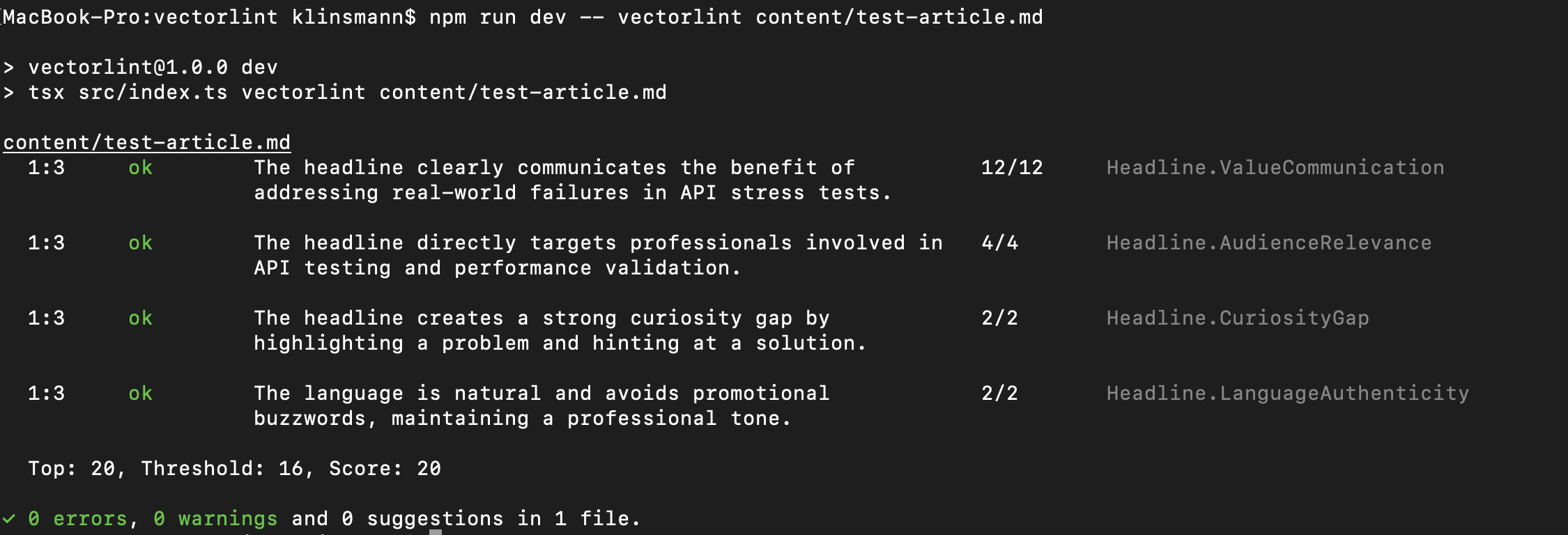
VectorLint is a command-line tool that runs content against carefully engineered content evaluation prompts.
It provides a score to its user as well as suggestions, enabling them to adjust their content to meet an acceptable quality standard or score.
As a command-line tool, it means it can be run in a CI/CD pipeline in GitHub, meaning that writers can get instant feedback on their content whenever they submit their articles. Instead of submitting drafts and waiting days for feedback, they get instant evaluation against TestingPod’s specific standards.
It could also be run locally, enabling writers to fix issues before submission.
What This Means For TestingPod
For TestingPod, this means they can scale their technical content strategy without increasing team overhead.
VectorLint makes it possible for a small team to maintain consistent quality standards across all contributors. Just turn style guides into evaluation prompts, and every contributor gets consistent feedback on their content.
And with fewer issues getting to the content team, it frees them up to focus on other priorities like distribution and community engagement.
Automated quality compliance ensures that every piece of content meets TestingPod’s standards, regardless of who wrote it.
The Vision: Giving Any Tester The Platform to Share Their Voice.
Our ongoing goal is to expand the evaluation prompt library continuously.
As the content team identifies new issues during reviews, we capture them and convert them into automated evaluation prompts. Over time, this creates a completely autonomous review system that enables anyone with valuable testing insights to share their knowledge, regardless of their writing ability.
TestingPod will truly become the hub where testers can share their unique experiences.