Category: Content Quality

  • Why You Need to Stop Enforcing Style Guides Manually

    Why You Need to Stop Enforcing Style Guides Manually

    You can get away with manual reviews as your only content quality gate when you’re the only contributor.

    However, the moment you have multiple people contributing to your content, quality issues start to slip through.

    A few engineers start updating docs, a PM adds launch notes, and someone copies an older page because it’s faster than starting from scratch. Then the same product starts getting described three different ways, section structures drift, and review quality depends on who opened the pull request that day.

    One page says “API key” while another says “access token,” and one update opens with a task list while the next opens with product copy.

    None of those issues is hard to spot in isolation, but catching them consistently across every contribution is challenging.

    To ensure you publish content that builds developer trust, you need to automate your content review workflow.

    Review Content How Developers Review Code

    Automated testing is a critical part of reliable software delivery, so development teams write tests and automate their execution in a CI/CD pipeline.

    When a developer opens a pull request on a version control platform such as GitHub, tests and linters run, and bugs and poorly written code are flagged immediately.

    You can do the same with your content by adopting a Content as Code workflow.

    Content as Code is the adoption of similar workflows that developers use to ship code to ship content. Just as developers use linters to check their code in CI pipelines, you can also use prose linters such as Vale or VectorLint to automatically flag issues in your content.

    Both tools are command-line prose linters that let you define rules based on your style guides and automate the checks in a CI/CD pipeline. You can catch spelling and terminology issues automatically, as well as issues that require contextual judgment, such as repetition and directness. So, rather than relying on manual reviews or using ChatGPT or Claude, you can use prose linters to automatically catch quality issues.

    Not that there’s anything wrong with using ChatGPT or Claude. The issue is that they’re not deterministic. A slightly different prompt can give a different result. So, while they might speed up your manual review process, they can’t consistently help you catch quality issues.

    With prose linters, you can catch terminology inconsistencies, AI patterns, passive voice, repetition, etc. You could even check for broken links with tools like Lychee and markdown structure with Markdownlint.

    By shifting from manual to automated style guide enforcement, you can catch recurring quality issues while focusing on the parts that require human validation, such as accuracy and taste.

    Setting Up Your Content as Code Workflow

    Use Git to track every change, and give contributors a structured way to submit updates for review.

    You don’t need to be deeply familiar with it. You can use coding agents like Claude Code or Codex to handle routine operations, including staging, committing, and opening pull requests.

    Once your content is in Git, set up your prose linters in CI. Use Vale for rule-based checks. It covers terminology, capitalization, heading conventions, and banned phrases.

    For anything requiring context, AI writing patterns, repetition across sections, or unsupported claims, use VectorLint. If you’d rather not maintain both tools, use VectorLint on its own. You can catch the same quality issues Vale does, but it incurs large language model (LLM) token costs and isn’t deterministic. Because VectorLint runs on an AI model, there’s a chance it may miss issues that Vale would consistently catch.

    What you gain, though, is a simpler setup with one tool and one config file to maintain.

    Add Lychee to your CI pipeline to catch dead links before they reach production. Once this is running, contributors get feedback on their changes before you ever look at the PR.

    Automate the Most Repetitive Issues First

    Scan your last few reviews. If the same terminology swap, heading fix, or structural note keeps coming up, turn it into a rule.

    For patterns like preferred terminology, capitalization, and banned phrases, write those checks directly in Vale. Existing style guides from companies like Google, Microsoft, and Datadog give you a starting point, so you don’t have to write all the rules from scratch.

    If there’s a rule that’s not in these company style guides, you can use an AI tool to write it.

    For issues that require contextual judgment, such as detecting AI patterns, identifying repetition across sections, and flagging unsupported claims, use VectorLint.

    VectorLint also ships with preset rules, but you can create rules by describing them in natural language or by using your existing style guide directly.

    There’s Some Maintenance Tax to It

    Maintaining the rules takes time.

    A Vale rule might catch a phrase you wanted to keep. A VectorLint rule may need better wording, tighter examples, or more context before it consistently flags the right thing. You may also notice recurring issues that deserve a rule only after they have slipped through review a few times.

    With Vale, maintenance often means adjusting rule logic and testing it against real examples. With VectorLint, it often means sharpening the instruction so the review output reflects the editorial judgment you actually want.

    If you’d rather not take that on in-house, TinyRocket helps developer tool startups set up and manage their content production workflows.

    We build a repeatable content production workflow to help developer tool startups produce quality content quickly, grow developer trust, and improve search discoverability.

    We automate content research, drafting, review, repurposing, and distribution, so you focus on the value you want to convey rather than the pipeline itself.

    Get in touch, and let’s talk through what that looks like for you.

  • Using VectorLint to Catch AI Content Patterns in Docs as Code

    Using VectorLint to Catch AI Content Patterns in Docs as Code

    When you use AI to draft documentation, whether tutorials, guides, or API references, you save hours of writing time.

    The problem is that AI-generated content often contains AI patterns that could erode developer trust:

    “It’s important to note that…”
    “In the landscape of software development…”
    “This isn’t just X; it’s Y.”

    Even when your content is technically accurate, these patterns make it sound lazy.

    You could manually review every piece of content to catch these patterns, or you could automate your review process to catch them instantly.

    This guide shows you how to use VectorLint to automatically check for AI patterns in your Docs as Code workflow.

    VectorLint, AI-Assisted Editing

    VectorLint is an AI-powered prose linter that enables natural-language standard enforcement.

    It uses LLM-as-a-Judge to evaluate content and catch quality issues, making it possible to catch issues like terminology and spelling errors that only require pattern matching, and also those that require contextual understanding, such as AI patterns, Search Engine Optimization (SEO) problems, and technical accuracy.

    As a command-line tool, it runs in CI/CD pipelines, enabling a shared quality gate across your teams, preventing errors from reaching production.

    To get started, install VectorLint on your computer.

    Installing VectorLint

    1. Install VectorLint: To install VectorLint globally, run:
       npm install -g vectorlint

    Verify installation:

       vectorlint --version

    Alternatively, you can run it directly using npx:

       npx vectorlint

    Configuration

    Before you can review content with VectorLint, you need to connect it to an LLM provider.

    1. Initialize VectorLint: Run the initialization command to generate your configuration files:
       vectorlint init

    This creates two files, .vectorlint.ini which contains project-specific settings
    and ~/.vectorlint/config.toml where you configure your LLM provider settings.

       # VectorLint Configuration
       # Global settings
       RulesPath=
       Concurrency=4
       DefaultSeverity=warning
    
       # Default rules for all markdown files
       [**/*.md]
       RunRules=VectorLint

    This configuration tells VectorLint to check all Markdown files using the bundled VectorLint preset.

    1. Configure your API keys: Open your global config file (~/.vectorlint/config.toml) and uncomment the section for your preferred LLM provider. VectorLint supports OpenAI, Anthropic, Google, and Azure models.
       # --- Option 1: OpenAI (Standard) ---
       # LLM_PROVIDER = "openai"
       # OPENAI_API_KEY = "sk-..."
       # OPENAI_MODEL = "gpt-4o"
       # OPENAI_TEMPERATURE = "0.2"
    
       # --- Option 2: Azure OpenAI ---
       # LLM_PROVIDER = "azure-openai"
       # AZURE_OPENAI_API_KEY = "your-api-key-here"
       # ...
    
       # --- Option 3: Anthropic Claude ---
       # LLM_PROVIDER = "anthropic"
       # ANTHROPIC_API_KEY = "your-anthropic-api-key-here"
       # ...
    
       # --- Option 4: Google Gemini ---
       # LLM_PROVIDER = "gemini"
       # GEMINI_API_KEY = "your-gemini-api-key-here"
       # ...

    Uncomment your preferred provider and add your API key. See the configuration guide for full details.

    1. Create a test file: Create docs/getting-started.md with some content containing AI patterns:
       # Getting Started
    
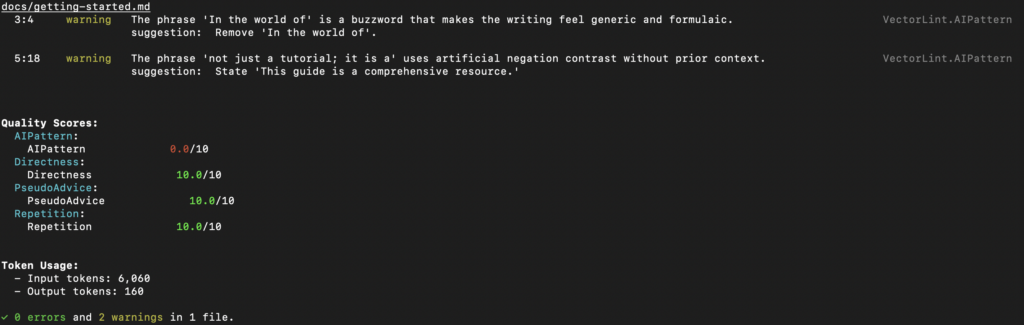
       In the world of software development, getting started with any new tool can be daunting.
    
       This guide is not just a tutorial; it is a comprehensive resource for developers.
    1. Configure AI pattern detection: VectorLint comes bundled with a VectorLint preset that includes AI pattern detection rules. The init command automatically configures this in your .vectorlint.ini file. The VectorLint preset includes these rules: AI-Pattern, Directness, PseudoAdvice, and Repetition. Rules in rule packs are automatically enabled unless explicitly turned off. For this guide, you only need the AI-Pattern rule, so turn off the others in your .vectorlint.ini:
       [VectorLint]
       Directness = disabled
       PseudoAdvice = disabled
       Repetition = disabled

    Running Your First VectorLint Check

    To run VectorLint on a file, use the command:

    vectorlint docs/getting-started.md

    VectorLint should output a quality report in your terminal:

    Adding VectorLint to Your CI/CD Pipeline

    Integrate VectorLint into your GitHub Actions workflow to automatically check documentation on every pull request.

    To add VectorLint to your CI/CD pipeline, create .github/workflows/lint-docs.yml:

    name: Lint Documentation
    on: [pull_request]
    
    jobs:
      vectorlint:
        runs-on: ubuntu-latest
        env:
          OPENAI_API_KEY: ${{ secrets.OPENAI_API_KEY }}
        steps:
          - uses: actions/checkout@v3
    
          - name: Setup Node
            uses: actions/setup-node@v3
            with:
              node-version: '18'
    
          - name: Run VectorLint
            run: npx vectorlint docs/*.md

    This workflow runs VectorLint on every pull request, checking all modified Markdown files against your quality rules. If VectorLint finds quality issues, the build fails, and the quality report appears in the PR comments.

    Next Steps

    You’ve now automated the detection of excessive hedging in your documentation. But there are more AI patterns worth catching:

    Expand your rule pack:

    • Define rules that match your company’s style guide
    • Share your rule packs across repositories
    • Use VectorLint scores as a metric for documentation quality

    By creating more rules, you can automate more quality checks and save time on content review. This helps you keep up with development velocity while maintaining the quality and trust your brand depends on.

  • Review Checklist, Why You Need One

    Review Checklist, Why You Need One

    For technical startups, you need to publish quality content consistently for your developer audience to trust you. However, endless review cycle creates bottlenecks that slow down your entire content operation and make consistency nearly impossible to maintain.

    But what if you could integrate the review process into your workflow from the start? What if writers and reviewers were already on the same page, checking for the same things, before content even reaches the review stage?

    That’s exactly what a content review checklist does. It’s a simple tool that ensures every writer complies with your style guide even before submission, cutting down review cycles and maintaining consistent quality across all your content.

    In this article, you’ll learn what a content review checklist is, why you need one, and how to create one and use it in your workflow.

    What Is a Content Review Checklist?

    A content review checklist is a structured list of specific items used to evaluate each piece of content before publication. It turns writing and formatting standards into clear, actionable checkpoints that reviewers can verify one by one.

    While a style guide defines your overall writing and formatting standards, a checklist converts them into quick itemized checks for writers and reviewers, covering key elements such as grammar, tone, spelling, brand voice, formatting, and SEO considerations.

    In essence, a checklist gives your team a quick, simple, and repeatable way to ensure every piece of content meets set standards without missing critical details.

    Consistent Quality and Voice Across Content

    When multiple contributors are involved, each writer applies their own interpretation of quality standards. One contributor might prioritize technical accuracy while another focuses on readability, leading to your content feeling inconsistent and unprofessional.

    Your audience won’t know what to expect from you, and for technical startups this is especially damaging because trust and credibility drive user adoption.

    However, implementing a review checklist before publication solves this problem by providing a unified quality benchmark. Every piece of content, whether written by in-house writers or guest contributors, passes through the same checks.

    Faster, Smoother Reviews

    Review cycles are often the biggest bottleneck in technical content operations. Writers wait for feedback while reviewers catch new errors in each round, creating frustrating back-and-forth delays.

    A content review checklist eliminates much of that friction.Writers can self-check their content against established criteria before submission, catching issues before they get to the reviewer’s desk. As a result, review iterations drop, rework decreases, and teams ship content faster while maintaining quality.

    Easier Scaling and Onboarding

    As your content operations grow, maintaining content quality as you onboard new writers becomes more challenging. New contributors face a learning curve before they can adapt to your writing style and brand voice, which adds pressure on reviewers and slows content production.

    But with a review checklist, new contributors get a roadmap of what “good” looks like and produce publishable content faster with less supervision. Hence, your checklist serves as a built-in training resource that lets you scale your content program without sacrificing consistency or burning out reviewers.

    Creating a Checklist from Your Style Guide

    If you already have a style guide, you can quickly convert it into an actionable checklist using this ChatGPT prompt:

    You are a content operations expert tasked with converting a style guide into a practical, actionable review checklist. Your goal is to transform style guide principles into specific, checkable items that writers can use for self-review and reviewers can use for quality verification.
    
    **Your Task:** Analyze the provided style guide and create a comprehensive content review checklist that ensures consistent quality, voice, and brand compliance across all content.
    
    **Input:** [Paste your complete style guide here]
    
    **Checklist Reqirement:**
    
    1. **Structure the checklist into clear categories** such as:
        - Brand Voice & Tone
        - Technical Accuracy
        - Formatting & Structure
        - SEO & Optimization
        - Grammar & Language
        - Visual Elements
        - Compliance & Legal
    2. **Make each item actionable and specific** - avoid vague statements like "check tone" and instead use specific criteria like "Does the content use active voice in at least 80% of sentences?"
    3. **Include binary yes/no checks** where possible, making it easy to verify compliance
    4. **Add brief explanations** for complex items that might need clarification
    5. **Prioritize items** by marking critical must-haves vs. nice-to-haves
    6. **Make it scalable** - suitable for both new contributors and experienced writers
    7. **Keep it practical** - aim for a checklist that takes 10-15 minutes to complete
    
    **Desired Output Format:**
    
    - Organized by category with clear headings
    - Checkbox format for easy use
    - Brief explanations where needed
    - Estimated time to complete each section
    - Priority levels (Critical/Important/Optional)
    
    **Additional Context:** This checklist will be used by [describe your team size, content types, and frequency]. The goal is to reduce review cycles, maintain consistency, and help new contributors produce publishable content faster.```
    

    Using Your Checklist

    The usual way to implement a checklist is for writers and reviewers to systematically work through each item, marking it complete before submission and publication.

    This approach helps prevent oversights and reduces unnecessary back-and-forth. However, manual checking is time-consuming, and under deadline pressure, it’s easy to skip items or rush through them.

    To reduce this burden, some teams try to automate the process with AI. They provide the content and checklist to tools like ChatGPT and ask it to evaluate each item.

    ChatGPT flags issues that need attention, which speeds up the review process compared to manual checking.

    But this approach has its limitations. You’re still manually copying and pasting content for every single piece, which creates friction and takes time. There’s no workflow integration, so it’s easy to skip this step entirely when deadlines are tight.

    Then there’s the consistency issue with generative AI models. The same content can receive different feedback across runs.

    Generative AI models may also miss nuanced issues a human would catch, or hallucinate problems that do not exist.

    Your Checklist, On Autopilot with VectorLint

    Instead of manually running checks, what if your checklist ran automatically on every content submission? That’s where VectorLint comes in.

    VectorLint is an LLM-powered prose linter that automates content quality checks. Think of it like Vale, but for content quality issues that require understanding context not just pattern matching, such as weak headlines, AI-generated writing patterns, unclear value propositions, etc.

    How VectorLint Works

    Convert your review checklist into automated rules that run in your CI/CD pipeline. Define checklist items as evaluation rules in simple Markdown files using natural language, then configure which rules apply to which content types.

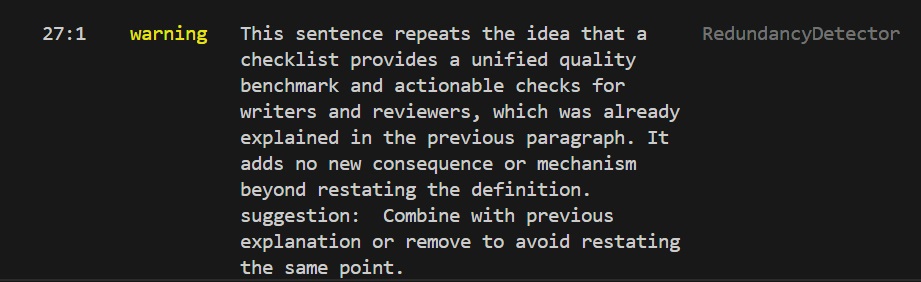
    For example, if your checklist includes “Avoid unnecessary repetition that doesn’t add value,” you can create a VectorLint rule that detects redundant phrases and explanations. The rule flags content where points are repeated without adding new information.

    VectorLint flagging redundant phrasing in an earlier draft of this article

    VectorLint runs automatically on every content submission via pull requests, commits, or any CI/CD trigger you configure. Content that doesn’t meet your standards gets blocked before reaching human reviewers, just like a failing test blocks a code merge.

    This way, writers get immediate, consistent feedback and quality standards are enforced uniformly across all contributors.

    VectorLint is open source and built by TinyRocket to help technical teams ship quality content faster. Need help with setup or custom rules? We’ll get you up and running.

  • The Easiest Way to Maintain Doc Quality With Several Contributors

    The Easiest Way to Maintain Doc Quality With Several Contributors

    Maintaining documentation quality is challenging when multiple contributors are involved. Each contributor brings their own writing habits, and small inconsistencies start to build up across the docs.

    Over time, this work shifts to editors. They spend hours each week fixing the same basic issues like terminology inconsistencies, formatting problems, and style mismatches which slows down updates.

    Editors spend significant time fixing style mismatches, causing documentation to lag behind active development.

    This article will show you how your team can maintain consistent documentation quality with multiple contributors, without burning hours and mental energy.

    What is Even Documentation Quality?

    Quality documentation gives readers what they want and expect. When developers and technical users come to your docs, they have expectations shaped by their goals and past experiences with technical documentation that works.

    Industry surveys reveal six fundamental expectations that define doc quality:

    1. Technical accuracy and completeness

    This criterion tops every list because readers expect your documentation to accurately reflect how the product works, including prerequisites, limitations, and edge cases.

    When they follow your instructions and encounter errors due to inaccurate or incomplete information, it makes them lose confidence in your product.

    2. Up-to-date and maintained content

    Your documentation should evolve with your product, staying current with new features, updated APIs, and best practices.

    Outdated instructions, broken links, or screenshots showing an outdated UI not only waste readers’ time but also signal neglect, which erodes trust and confidence in your product.

    3. Practical examples and guidance

    Simply describing features without context is not enough to show developers how to use your tool. They need to understand how those features fit into real workflows and how to troubleshoot errors when they don’t behave as expected.

    Developers find it helpful to have common use cases, integration patterns with popular tools, and clear troubleshooting flows for known issues.

    4. Clear structure and findability

    Developers are often under tight deadlines and need to find answers quickly without having to read through the entire piece of content.

    Hence, your docs should prioritize speed to value by following a consistent, logical structure with headings that reflect common tasks or user intent.

    For example, “How do I migrate from X?” or “Integrating with Y,” rather than just listing features. Effective search and predictable organization help users locate information efficiently and get back to work faster.

    5. Consistent terminology

    When one article uses “API key” and another uses “access token” for the same concept, readers have to stop and verify whether these are different things, interrupting their workflow and causing unnecessary cognitive load.

    They expect to learn your system’s vocabulary once and apply it everywhere. Inconsistent terminology signals a lack of coordination and erodes trust in the documentation’s reliability.

    6. Clarity and conciseness

    The goal is to help your readers quickly understand and apply information. Hence, your documentation should use clear, simple language, and explain technical jargon when first introduced.

    Sentences should be direct, instructions actionable, and content free of unnecessary repetition.

    Where Doc Quality Problems Appear with Several Contributors

    Documentation quality issues often appear in environments like the ones below.

    Open Source Projects with Community Contributors

    Open source projects often receive documentation contributions from people with diverse backgrounds.

    They bring different writing styles, spelling conventions, formatting preferences, and terminology choices that usually do not align with your project’s preferred style.

    When you receive several open-source documentation PRs each month, correcting terminology, formatting, and style in each one can take hours. Furthermore, errors slip through when maintainers are overwhelmed.

    Engineering Teams with One Technical Writer

    Some teams have one technical writing expert maintaining the documentation contributions from dozens of engineers.

    These engineers are engineers first and writers second, so their writing skills vary. And because documentation isn’t their primary work, they don’t have the time to master style guides and writing conventions, which inevitably leads to quality issues.

    This puts a heavy load on the technical writer. As contributions stack up, they spend days correcting basic style violations, inconsistent terminology, improper heading hierarchy, and tone mismatches before they can even assess whether the technical content is accurate.

    Meanwhile, engineers wait days for feedback on their contributions. In high-velocity teams shipping features weekly, documentation falls behind because the writer can’t keep pace with the volume of corrections.

    Existing Solutions

    Manual Review

    Many editors have a checklist of quality checks to review, usually including passive voice, terminology, heading hierarchy, code formatting, and technical accuracy. The process usually involves reading through content multiple times, focusing on different aspects each pass.

    This method works because it allows the reviewer to concentrate on the most critical quality issues. However, it becomes unsustainable when there are large volumes of contributions from multiple writers.

    Manual review is time-consuming and mentally exhausting, and as fatigue sets in, even experienced editors may miss errors or inconsistencies despite their best efforts.

    Prose linters (Vale, Markdownlint)

    Prose linters are automated tools that scan writing for style and formatting issues based on predefined rules. They help teams catch problems early and enforce consistency across documentation.

    Vale is the most popular prose linter. It automates style checks using configurable rules, catching terminology mistakes, formatting issues, and other objective errors. Markdownlint focuses on structural checks, such as heading hierarchy, spacing, and list formatting.

    These tools are genuinely useful because once the rules are set up, they apply them automatically to every contribution, removing a lot of repetitive manual checking.

    However, getting Vale running well takes significant configuration effort. Teams often spend weeks defining rules, and that upfront work becomes a barrier to adoption.

    As documentation grows, the maintenance burden also increases. Edge cases show up, rules need refinement, and false positives appear when valid writing gets flagged because the tool can’t interpret context.

    In addition, proselinters only catch objective issues, such as consistency in terminology and formatting. Subjective areas that require contextual understanding, such as clarity, tone, explanation quality, and technical accuracy, are left for human review, which takes time.

    LLM + Checklists

    LLMs understand context in ways rule-based proselinters can’t. For example, they can tell when passive voice is acceptable in a technical explanation and when active voice would make a tutorial clearer.

    As a result, many teams pair LLMs with their existing checklists. They paste content into ChatGPT, include the checklist, and ask it to review the writing.

    However, this approach is a naive use of LLMs. Their output isn’t consistent, and you can’t reliably predict or reproduce the results.

    The same prompt can generate different responses across runs, and without structured prompting and controlled settings, the feedback varies widely. As a result, LLMs often miss important quality issues.

    A Better Way to Do Things

    Although these existing quality tools save time, they still leave quality gaps. Rule-based tools miss issues that require contextual understanding, while basic LLM use is inconsistent and unpredictable. You need a system that combines automation with intelligent judgment.

    VectorLint fills this gap. It’s an LLM-powered prose linter that evaluates subjective qualities like clarity, tone, and technical accuracy, nuances that regex rules miss.

    By using structured rubrics at low temperatures, VectorLint provides consistent, actionable feedback that addresses LLMs’ unpredictability.

    Setup is simple: describe your standards in natural language, and VectorLint enforces them in your CI/CD pipeline.

    Think of it as a complementary system to Vale. Use Vale for the rigid objective rules, and VectorLint for the intelligent subjective review. This combination saves editors even more work hours to focus on strategy instead of style policing.

    At TinyRocket, we built VectorLint to solve this exact problem. We work with teams to define quality standards and implement tailored docs-as-code workflows that specifically fit their needs.

    Book a call to discuss your documentation quality challenges.

  • Content as Code: Why Technical Teams Should Lint Prose Like They Lint Code

    Content as Code: Why Technical Teams Should Lint Prose Like They Lint Code

    Your engineering team already relies on linters like ESLint, Prettier, or Rubocop to catch code issues before they reach production.

    These tools flag style violations, enforce consistency, and reduce code review time by automating the tedious aspects of quality control, leading to quicker code reviews, consistent output, and a lower mental burden.

    Unfortunately, most technical teams don’t apply this same practice to their technical content.

    Docs, guides, and tutorials undergo entirely manual reviews, where reviewers spend time flagging missing Oxford commas, inconsistent terminology, and overly long sentences.

    If you’re a small content team supporting dozens of engineers or managing contributions from external developers, this manual review process becomes a bottleneck.

    Reviewing technical content manually results in slow publishing cycles, inconsistent docs quality, and frustrated contributors.

    This is where prose linting comes in.

    Prose linting solves these issues by automating style and consistency checks the same way code linters do. It’s a significant part of the Content as Code approach: treating all technical content with the same rigor as code.

    What Is Content as Code?

    Content as Code extends the Docs as Code methodology beyond docs to all technical content, meaning guides, tutorials, and blog posts, treating them with the same rigor as software code.

    This means writing content in Markdown, storing it in version control, conducting reviews through pull requests, and running automated quality checks as part of your publishing pipeline.

    Everything sits in the same repository and follows the same development workflow.

    This approach works well for engineering teams because it integrates seamlessly with the tools they use daily. There’s no need to switch to a separate editor or learn a new publishing system. Writing, reviewing, and releasing docs becomes part of the same workflow as writing code.

    This methodology provides proper version history for all content, supports collaborative workflows across roles, and supports the addition of automated quality checks as part of the publishing pipeline.

    Organizations like Google, Microsoft, GitHub, Datadog, and ContentSquare already use Docs as Code. Extending it to all technical content enables faster growth.

    You Grow Faster with Automated Content QA

    Ship Content Faster

    Automated linting handles the first-pass review for style, terminology, and consistency, so human reviewers can focus on technical accuracy instead of policing syntax.

    Authors get feedback immediately in their IDE or when they open a pull request, allowing issues to be corrected before review, shortening review cycles, and increasing merge speed without reducing quality.

    At Datadog, a 200:1 developer-to-writer ratio still supports reviewing around 40 docs pull requests per day. In 2023, the team merged over 20,000 pull requests across dozens of products and integrations.

    Automated checks made this volume possible by catching repetitive style issues early and reducing the mental load on writers and reviewers without adding headcount.

    When a prose linter like Vale runs in CI, it catches most style guide violations even before a human reviewer sees the PR, so reviewers spend less time pointing out minor fixes, and pull requests move through review faster.

    Scale Your Contributor Program

    External contributors often submit content with inconsistent style and terminology because they haven’t memorized your style guide. Without automated checks, reviewers spend time explaining these standards through manual feedback on every PR.

    However, automated prose linting communicates these standards through immediate, actionable feedback, so contributors see and grasp “what good looks like” without reading lengthy style guide documents.

    ContentSquare saw measurable growth in engineering contributions after implementing Vale for prose linting.

    Engineers reported feeling more confident contributing because they received clear guidance about what to fix. This lowers the barrier to entry for developers who are technical experts first and writers second.

    Build Developer Trust

    Consistent terminology and style signal professionalism and reliability to your users.

    Docs quality directly shapes product trust and adoption, especially with technical audiences who quickly lose confidence when they encounter inconsistent terminology or explanations.

    If one page says “authenticate” and another says “log in,” or if the same concept is described in different ways across pages, developers notice.

    Automated quality checks prevent these issues before they reach production by enforcing consistency across the entire docs set, which helps you maintain credibility as the product evolves.

    Furthermore, automated checks ensure your docs remain current as your products evolve. When docs lag behind releases, developers lose confidence in their accuracy.

    Automated checks solve this by allowing teams to ship updates quickly without compromising quality standards. The combination of consistent quality delivered at speed becomes a competitive advantage for developer adoption.

    What Vale Does

    To implement automated prose linting, most engineering teams start with Vale, an open source prose linter that checks content against style rules.

    It runs locally on your machine, inside your IDE, via pre-commit hooks, in pull request checks, or as part of your CI/CD pipeline.

    Vale understands the syntax of Markdown, AsciiDoc, and reStructuredText, so it can parse your content correctly and ignore code blocks or other markup.

    Alternative prose linters include textlint, proselint, and alex, but Vale is the most common choice among engineering teams.

    Basic Setup Steps

    • Install Vale via your package manager (Homebrew on macOS, Chocolatey on Windows, or apt/yum on Linux)
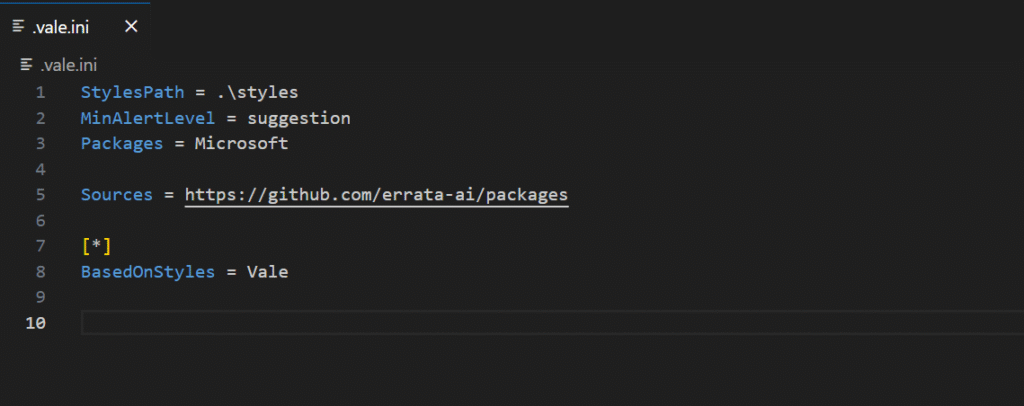
    • Generate a .vale.ini default configuration file at your project root. You can use existing style packages like Google or Microsoft, or create custom rules.
    Vale-installation-1
    • Run vale sync to download the style package
    • Run vale [path/to/content] to lint your files

    What Automated Feedback Looks Like

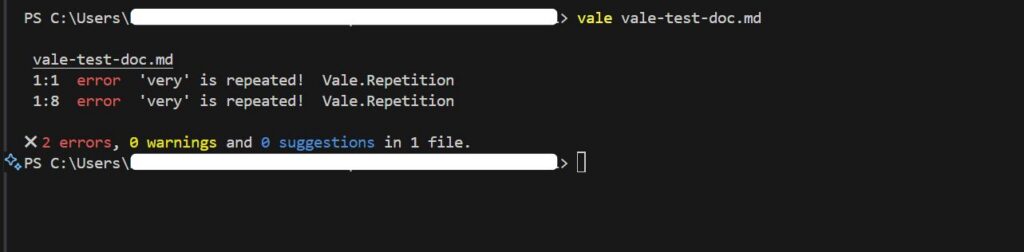
    Vale flags issues with line numbers and provides suggested fixes for problems like overly long sentences, filler words, inconsistent terminology, and style violations like missing Oxford commas.

    This feedback appears whether you run Vale in your terminal, your IDE, or as automated comments on pull requests.

    Once you see how Vale flags issues, you’ll be tempted to enable every available rule. Resist that urge.

    Start with 5 Rules, Expand Over Time

    The Progressive Rollout Approach

    Don’t launch with 50 rules; start with 5-10 focused on your biggest pain points. Pilot Vale on one docs set, such as your API reference, getting started guide, or README files.

    Gather feedback from your team and iterate on the rules based on what they find helpful or frustrating. Expand coverage gradually as the system proves its value.

    Teams that roll out too many rules at once face resistance and overwhelm from contributors. A progressive rollout builds team buy-in and confidence in the system.

    You’ll see initial value within weeks, with fewer style inconsistencies flagged during review, and faster merge times. The benefits compound over months as your team internalizes the standards and your rule set matures. 

    ContentSquare implemented this approach and saw a growth in contributions as engineers became more confident in contributing to docs.

    This progressive approach works, but it’s not a “set it and forget it” solution.

    You Need Maintenance To Succeed

    Setting up prose linting requires an initial time investment for installation and rule tuning.

    Some rules will need adjustment based on your specific content type, as what works for API docs may be too strict for tutorial content or technical guides.

    Team buy-in matters more than perfect configuration from day one, and the system works best when integrated into your existing workflow.

    Expect to refine rules as your team discovers edge cases, add exceptions for product-specific terminology, and occasionally tune thresholds for readability metrics.

    The good news is maintenance gets easier over time as your rule set stabilizes and your team adapts to the workflow.

    Many engineering teams at companies like Datadog and ContentSquare automate their content quality checks, reporting significant improvements in review speed and output consistency.

    The challenge for smaller teams is implementing and maintaining the automation pipeline.

    That’s where TinyRocket helps: we implement production-ready prose linting systems tailored to your workflow, so you can focus on building your product, not maintaining docs tooling.

  • Prose Linting for Technical Teams: What Grammarly Can’t Do

    Prose Linting for Technical Teams: What Grammarly Can’t Do

    As your content volume grows, you’ll quickly realize that Grammarly alone isn’t enough to maintain content quality at scale, regardless of whether you’re a solo technical writer or part of a team.

    Creating high quality technical content requires that you maintain several quality standards.

    You need to check that the content actually solves the problem, uses inclusive language, avoids passive voice, and doesn’t contain vague advice, among other things.

    Using Grammarly with checklists is a manual process that becomes time-consuming and error-prone as you scale output.

    You might decide to hire more technical writers to meet the content demands, but now you’ll have to deal with a new problem.

    Multiple writers introduce inconsistent styles and more opportunities for human error.

    That’s why companies like Datadog, Grafana, and Stoplight use prose linters in their documentation pipeline to save time on reviews and produce high-quality developer content.

    Prose linters are tools that check your writing against defined style rules. They’re similar to code linting tools. But while code linters catch syntax errors and enforce coding standards, prose linters catch style violations and enforce writing standards before content gets published.

    That enforcement capability is what makes them suitable for automating review workflows, saving time and maintaining quality standards.

    Let’s consider five ways prose linters help you save time on content reviews and maintain content quality that Grammarly alone doesn’t.

    1. Enforcing Style Guides

    When one API tutorial refers to authentication credentials as “API keys” while another uses the term “access tokens,” developers may wonder if these terms refer to different concepts.

    If this happens across dozens of terms, the documentation becomes unreliable.

    Grammarly enables you to upload style guides and define preferred terms, and it flags violations in real-time as writers work. The problem is that writers can dismiss these suggestions, which means the content lead needs to re-check every writer’s submission to ensure they didn’t dismiss important recommendations.

    That’s more time spent on review.

    And if you’re working alone, you’d have to ensure you’re always thorough with your work—not a bad thing to do, but it’s still susceptible to human error.

    Prose linters, such as Vale, solve this by blocking publication when Vale identifies an error. When set up in a CI/CD pipeline, you can configure Vale to check every pull request against your defined rules. So, your style guide specifies “email” not “email,” the linter flags every violation and blocks publication until corrected.

    Every contributor, whether a guest author, engineer, or technical writer, receives the same feedback when they submit content.

    2. Protecting Intellectual Property

    Where your content goes matters when you’re working with unreleased features under NDA or proprietary systems.

    Grammarly processes content on its cloud infrastructure. And while the company is security compliant (SOC 2 Type 2, ISO 27001, GDPR), it may not meet the requirements of every organization.

    For instance, in 2019, Microsoft explicitly banned Grammarly, citing concerns that the tool could access protected content within emails and documents.

    Prose linters run entirely on your infrastructure. Install and run them locally, and they process content without requiring an internet connection.

    When policy prohibits external processing, local tools are the only option

    3. Enforcing Document Structure and Formatting Standards

    How headings, lists, emphasis, and italics impact readability and how content renders across platforms.

    Grammarly preserves basic formatting, but it doesn’t validate whether headings follow proper hierarchy. It won’t flag inconsistent bullet point styles or enforce that documents start with a title heading.

    Structural linters, such as Markdownlint on the other hand, address these requirements. You can enforce unique H1 headings, consistent list indentation, and proper heading hierarchy for accessibility.

    4. Creating Contextual Rules Based on Document Metadata

    Different kinds of developer content require different style enforcement. A reference document might demand precise technical terminology and consistent parameter descriptions, while a tutorial might allow conversational tone and varied phrasing to maintain engagement.

    Grammarly applies rule sets uniformly at the organization level. This works well for maintaining consistent voice across all communications, but it can’t differentiate between document types or adjust enforcement based on content purpose.

    Prose linters support conditional rule application through document metadata. Add frontmatter to your Markdown files indicating document type or target audience, and you can enforce stricter terminology in customer-facing docs, relaxed tone in internal wikis, and API-specific rules only for reference documentation.

    5. Integrating Quality Checks Into Development Workflow

    Developers already automate quality enforcement. Code doesn’t merge until it passes linting, testing, and review. Documentation should work the same way.

    Grammarly provides immediate feedback during writing. But it can’t create enforceable quality gates. Grammarly can’t block a pull request or prevent content from merging when style violations exist.

    Prose linters integrate directly into CI/CD pipelines. Add a prose linter to your GitHub Actions workflow, and every documentation pull request gets automatically checked against your style rules. The linter flags violations and blocks the merge if critical rules fail.

    Human reviewers see only content that’s already passed automated style validation. Mechanical checks happen automatically, so reviewers can focus on technical accuracy and clarity.

    When to Use Each Tool

    Both Grammarly and Prose linters improve documentation quality, but they target different aspects of the writing process.

    Grammarly provides real-time feedback on grammar and clarity. Prose linters catch terminology inconsistencies across your own documentation over time, ensuring you follow your own style guide consistently even when writing alone. When combined, both tools help you create high-quality technical content.

    It is even more essential for teams with multiple contributors. Grammarly raises each person’s baseline writing quality, while prose linters enforce team-wide consistency that manual review can’t maintain at scale.

    Rather than choose between them, use both to maintain the content quality you need to attract and retain developer trust.

    Getting Prose Linting Right

    Implementing prose linting in production isn’t a set-and-forget. It requires initial setup investment and ongoing maintenance.

    After the initial setup, false positives emerge as your team writes more content, rules conflict with edge cases, and contributors grow frustrated when legitimate writing gets flagged. Without continuous refinement, teams risk abandoning their linting setup entirely.

    To get started, install Vale and configure a few essential style rules from established packages, such as the Microsoft or Google style guides, then integrate it into your CI/CD pipeline.

    Get feedback from your team as they encounter issues, then adjust the rules as you identify frequent false positives or new patterns that the rules don’t cover.

    However, if you’d like to skip the trial-and-error phase and focus on your writing, we can handle the entire workflow for you. From initial configuration to ongoing maintenance, so your team can focus on other priorities.

    Companies like Datadog and Stoplight report significant improvements in review cycle speed, content consistency, and measurable quality gains after implementing prose linting.

    Book a call, let’s discuss how you can improve your content quality